
Acer USB-C Docking Station Dual Monitor, 9-in-1 Laptop Dock with 2 HDMI | Laptop Docking Station with 4K@60Hz HDMI, USB A&C 3.0, SD /Micro SD, 100W PD Compatible with Acer /Dell XPS /HP /Mac (0.65FT)
Price may vary by location, shipping cost, and availability.
Price History Information
You can check the price history of Acer USB-C Docking Station Dual Monitor, 9-in-1 Laptop Dock with 2 HDMI | Laptop Docking Station with 4K@60Hz HDMI, USB A&C 3.0, SD /Micro SD, 100W PD Compatible with Acer /Dell XPS /HP /Mac (0.65FT) here.
Product Information
Details
| Product Name | Acer USB-C Docking Station Dual Monitor, 9-in-1 Laptop Dock with 2 HDMI | Laptop Docking Station with 4K@60Hz HDMI, USB A&C 3.0, SD /Micro SD, 100W PD Compatible with Acer /Dell XPS /HP /Mac (0.65FT) |
|---|---|
| Store Product Code | B0GX18BJKW |
| Store Name | amazon.com |
| Brand | Acer |
| Rating | 8.4 / 10 |
| Category | Docking Stations |
| Color | Grey |
Features
- 9-in-1 USB-C Docking StationThis Acer laptop docking station includes 2 HDMI(4K@60Hz), 3 USB-A (5Gbps), 1 USB-C (5Gbps), 100W PD charging, and SD/MicroSD slots (104Mbps). Note: - ( ) .
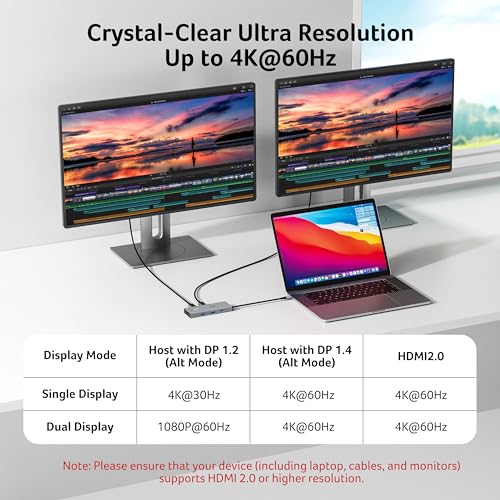
- Stunning Dual 4K@60Hz DisplayThis USB-C docking station supports dual monitors via 2 HDMI ports with 4K@60Hz resolution, making screen extension or mirroring easy. Note: ( , , ) . . : - - ; - .
- Fast Data Transfer & Easy AccessThis Acer USB-C docking station offers 1 USB-C (5Gbps), 3 USB-A (5Gbps), and dual SD/MicroSD slots (up to 104Mbps) for fast, reliable file transfers.
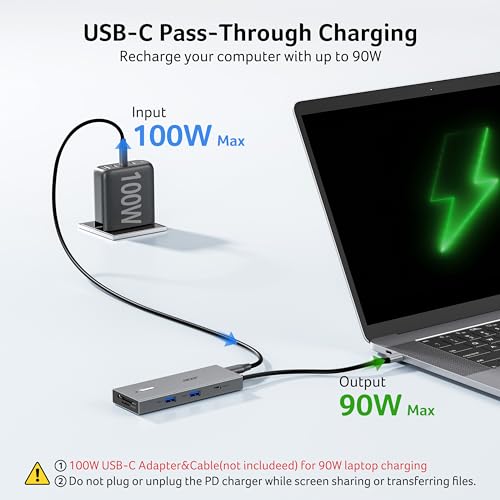
- 100W PD Fast Charging, Efficient Power SupplyThis Acer USB-C hub supports up to 100W input and delivers up to 90W to your laptop, allowing you to stay charged while using the docking station. : - (); 100+ ( ).
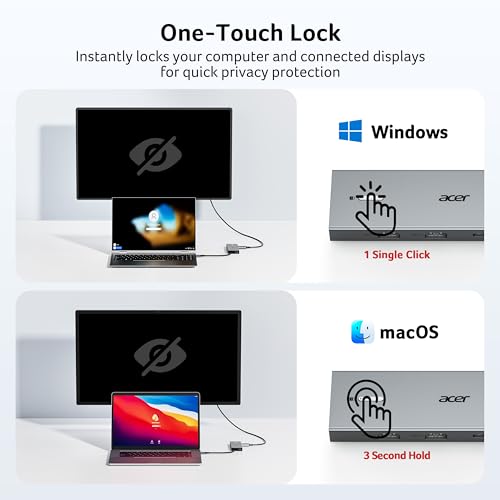
- Thoughtful DetailsThis docking station has a 0.65FT built-in cable, an aluminum alloy body, and a lock button for device security. Single click locks Windows; press and hold 3s for Mac.
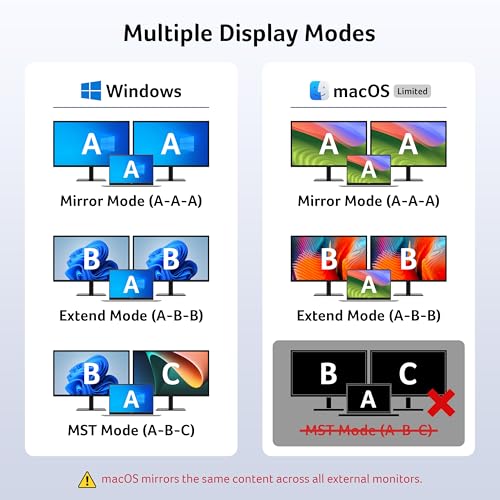
- Universal CompatibilityThis docking station is designed for laptops with full-featured USB-C ports that support display, charging, and data transfercompatible with Dell, Lenovo, and Surface devices. For Mac users: macOS can only mirror the same content across all external monitors.
- - : System Settings > Privacy & Security > Accessories, then set it to Always Allow. : Plug-and-play ready, enable external devices in Settings > Devices. After setting, reconnect the docking station and wait for your computer to recognize the device.
Images
× ![]()



Rating and Reviews
8.4 Based on 2378 reviews
Acer USB-C Docking Station Dual Monitor 9-in-1 has 8.4 rating out of 10. This average rating is consist of 2378 individual ratings. You can rate this product at product review page.
* Predictions is created on based of past prices and trends, it does not guarantee that it will happen. These are just prediction for theoretical information only.